Web Components原生支持的组件化


一、前因
十一国庆期间,看到大街小巷的红旗飘飘,于是乎想到,可否用H5做个动画国旗,发现了个有趣的东东,
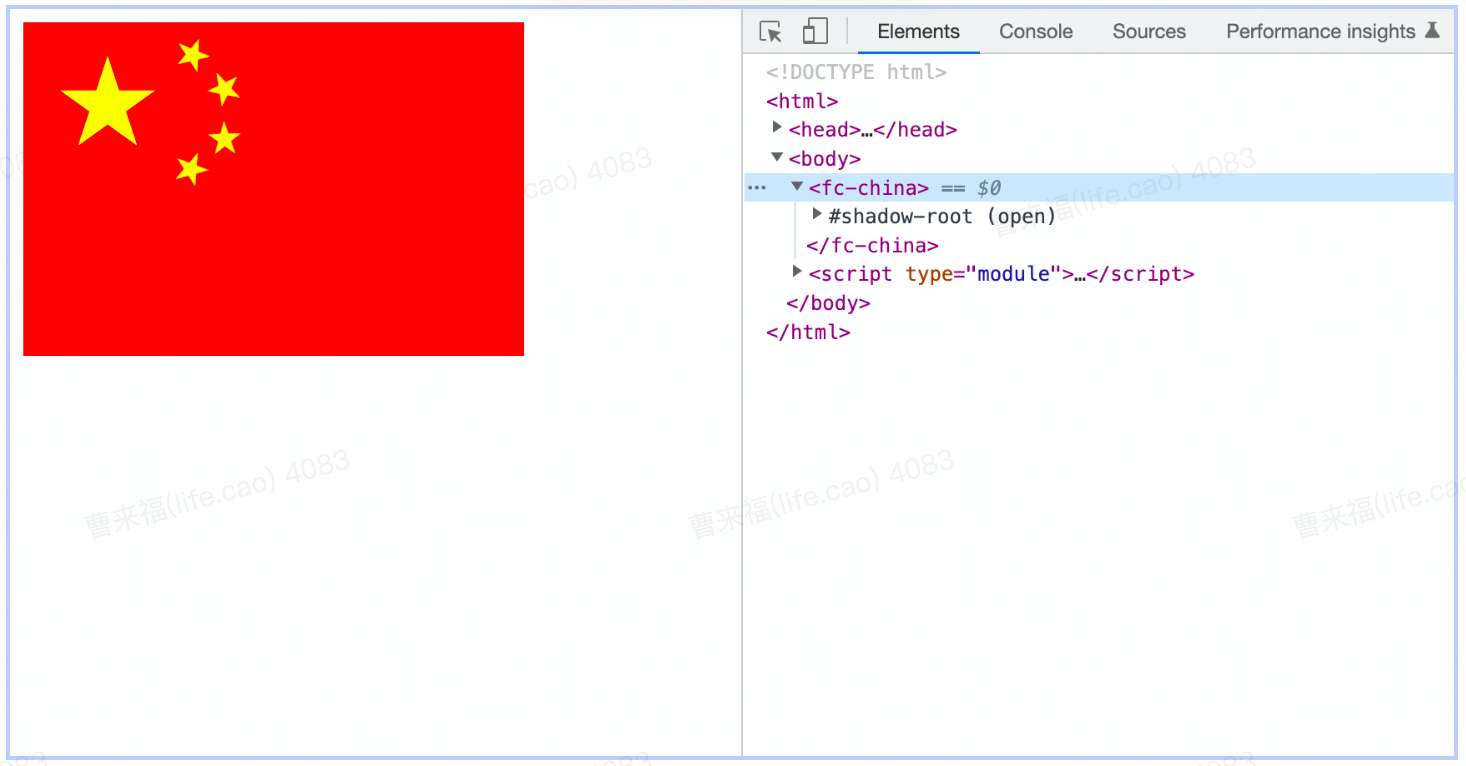
一个html静态文件,出现了一个自定义组件?炫酷的动画,有点撩,很难不想了解它一下点击体验,不慎入坑Web Components。
二、 fancy-components
国旗动画的来源
HTML
<!DOCTYPE html>
<html>

<head>
  <meta charset="UTF-8">
  <meta http-equiv="X-UA-Compatible" content="IE=edge">
  <meta name="viewport" content="width=device-width, initial-scale=1.0">
  <title>fancy-components</title>
</head>

<body>
  <fc-china></fc-china>

  <script type="module">
    import { FcChina } from './fancy-components/index.js'

    // new 就相当于全局注册了这个组件,相当于 Vue 的 Vue.component('FcChina', 组件)
    new FcChina()
  </script>
</body>

</html>fancy-components:直译 - 花式组件库,一个 Web Components 组件库。接下来介绍下到底什么是 Web Components吧。
三、什么是 Web Components
Google一直在推动的浏览器 原生组件 ,即 Web Components API。 它就是为了解决"组件化"而诞生的,它是浏览器原生支持的组件化,不依赖任何库、依赖和打包工具就可以在浏览器中运行。Web Components 不是一门单一的技术,而是四门技术的组合,这四门技术分别是:
Shadow DOM
HTML templates
Custom Elements
HTML Imports(已废弃不再介绍)
Shadow DOM和 HTML templates( and slots) 类似 Vue 的 Slot,不作详解,有兴趣的同学可点击上面来自MDN的链接学习。下面就介绍里面最重要的一项技术,同时也是所有浏览器都没有提出反对意见,一致通过的一项技术 —— Custom Elements (自定义元素)。
四、Custom Elements
基础使用
它使开发者能够将 HTML 页面 的功能封装为 custom elements(自定义标签),window 全局对象上有一个 customElements 提供自定义元素支持,它包含四个 API:
define:注册/定义自定义元素
get:获取自定义元素的构造函数
whenDefined
upgrade
define
注册组件(自定义元素),不能写成自闭和标签,浏览器会当作起始标签包裹后面的全部内容
HTML
<!DOCTYPE html>
<html lang="en">

<head>
    <meta charset="UTF-8" />
    <title>Custom Elements</title>
</head>

<body>
    <!-- 使用元素 -->
    <huo-la-la></huo-la-la>
    <!-- 不能写成自闭和标签,浏览器会当作起始标签包裹后面的全部内容 -->
    <!-- <huo-la-la /> -->

    <script>
        // 注册组件(自定义元素)
        window.customElements.define(
            // 参数1:元素名,必须包含一个短横线,以区分原生元素
            'huo-la-la',

            // 参数2:用于定义元素行为的类(类似 React 中的类组件),必须继承自 HTMLElement
            class extends HTMLElement {
                constructor() {
                    super()

                    // custome elements 类中的 this 指向组件本身
                    console.log(this)

                    this.innerHTML = '<h1>货拉拉</h1>'
                    this.onclick = () => alert('啥车都有')
                }
            }
        )

        // 多次注册相同名称的组件会报错:
        // the name "huo-la-la" has already been used with this registry
        // window.customElements.define('huo-la-la', class extends HTMLElement {})
    </script>
</body>

</html>
get
获取第三方组件的构造函数,用于继承扩展,给上面国旗案例扩展一个点击事件
HTML
<!DOCTYPE html>
<html>

<head>
  <meta charset="UTF-8">
  <meta http-equiv="X-UA-Compatible" content="IE=edge">
  <meta name="viewport" content="width=device-width, initial-scale=1.0">
  <title>fancy-components-click</title>
</head>

<body>
  <my-fc-china click></my-fc-china>
  <script type="module">
    // 要在服务器环境下运行,建议 http-server
    import { FcChina } from './fancy-components/index.js'

    // new 就相当于全局注册了这个组件,相当于 Vue 的 Vue.component('FcChina', 组件)
    new FcChina()

    // 获取第三方组件的构造函数,用于继承扩展
    const FcChinaConstructor = customElements.get('fc-china')
    customElements.define(
      'my-fc-china',
      class extends FcChinaConstructor {
        constructor() {
          super()
          this.onclick = () => console.log('自定义点击事件')
        }
      }
    )
  </script>
</body>

</html>
whenDefined
whenDefined是元素定义后触发的回调,接口返回Promise,通常用于异步注册组件的时候
<!DOCTYPE html>
<html lang="en">

<head>
  <meta charset="UTF-8" />
  <title>whenDefined</title>
</head>

<body>
  <huo-la-la>加载中...</huo-la-la>

  <script>
    // 模拟 JS 代码执行延迟
    setTimeout(() => {
      customElements.define(
        'huo-la-la',
        class extends HTMLElement { }
      )
    }, 2000)

    // 返回一个 Promise
    customElements
      .whenDefined('huo-la-la')
      .then(() => {
        document.querySelector('huo-la-la').innerHTML = '货拉拉'
      })
      .catch(err => console.log(err))
  </script>
</body>

</html>
upgrade
如果在定义元素之前先使用 JS 创建了元素,则元素实例并不是继承的定义元素行为的类,可以使用upgrade
HTML
<!DOCTYPE html>
<html lang="en">

<head>
  <meta charset="UTF-8" />
  <title>upgrade</title>
</head>

<body>
  <script>
    // 先使用 JS 创建自定义元素
    const el = document.createElement('huo-la-la')

    // 再注册自定义元素
    class Huolala extends HTMLElement { }
    customElements.define('huo-la-la', Huolala)

    // 返回 false
    console.log(el instanceof Huolala)

    // 升级元素
    customElements.upgrade(el)

    // 返回 true
    console.log(el instanceof Huolala)
  </script>
</body>

</html>
五、Web Components 对 Vue 的影响
潜看一段Vue和Web Components引入组件的对比
Vue 组件 my-span.vue
<!-- my-span.vue -->
<template>
  <span>my-span</span>
</template>

<script>
export default {};
</script>

<style>
span {
  color: purple;
}
</style>
只需要将它稍微修改一下,它就会变成 Web Components 文件,能够直接在浏览器中运行,不用像vue那么复杂需要node、webpack、loader等打包后,浏览器才能识别。
Web Components组件 my-span.html
HTML
<!-- my-span.html -->
<template>
  <span>my-span</span>
</template>

<script>
  // 获取 DOM 元素
  const dom = document.currentScript.ownerDocument.querySelector('template').content

  // 有点像 React 定义组件的写法
  class MySpan extends HTMLElement {
    constructor() {
      super()
      this.attachShadow({ mode: 'open' }).appendChild(dom)
    }
  }

  // 注册组件
  customElements.define('my-span', MySpan)
</script>

<style>
  span {
    color: purple;
  }
</style>
使用 HTML Imports 在 HTML 页面中引入组件:
HTML
<!-- index.html -->
<!DOCTYPE html>
<html lang="en">
<head>
  <meta charset="UTF-8">
  <title>Document</title>
  <!-- HTML Imports -->
  <link rel="import" href="my-span.html">
</head>
<body>
  <my-span></my-span>
</body>
</html>
当看到这里的时候,感觉,这不就是跟vue很像,不对,应该是vue跟Web Components很像很像,其实并不是巧合,尤大在创作Vue时,大量参考了Web Components的语法。
上文提到HTML Imports已废弃,上文只是为了对比当时跟vue的相似度,加以修改,只需要用js生成dom即可,my-span.html 改为my-span.js
// my-span.js
class MySpan extends HTMLElement {
  constructor() {
    super()
    this.render()
  }

  // 生成 HTML 和 CSS
  render() {
    const shadow = this.attachShadow({ mode: 'open' })

    const dom = document.createElement('span')
    const style = document.createElement('style')
    // dom.textContent = 'my-span'
    dom.innerHTML = `
      <slot>默认内容</slot>
      <slot name="content">默认内容</slot>
    `
    style.textContent = `
      span {
        color: purple;
      }
    `
    shadow.appendChild(style)
    shadow.appendChild(dom)
  }
}

// 注册组件
customElements.define('my-span', MySpan)
index.html
<!-- index.html -->
<!DOCTYPE html>
<html lang="en">

<head>
  <meta charset="UTF-8">
  <title>Document</title>
  <!-- HTML Imports(已废弃) -->
  <!-- <link rel="import" href="my-span.html"> -->

  <!-- ES Modules -->
  <script type="module" src="my-span.js"></script>
</head>

<body>
  <my-span>
    <h1>默认插槽</h1>
    <h2 slot="content">具名插槽</h2>
  </my-span>
</body>

</html>
slot的使用是不是vue也跟Web Components很像。Vue和React的官网也提到了和Web Components的关系,Vue 与 Web Components、在React 中使用 Web Components。
六、推荐 Web Components 的一些学习路径
本文也参考了如下的文档和博客内容,想深入学习的同学可参考:
官方-需梯子
本文demo的代码包: web-componets.zip
注:使用 ES Modules ,都需要开启一个 Web 服务,使用 VS Code 的 Live Server 插件或者使用http-server。
评论