吐血整理react快速入门精华(一)

1. React 介绍
React 是一个用于构建用户界面的 JavaScript 库,它只负责应用的视图层,帮助开发人员构建快速且交互式的 web 应用程序。
React 使用组件的方式构建用户界面。
2. JSX 语法
在 React 中使用 JSX 语法描述用户界面,它是一种 JavaScript 语法扩展。
在 React 代码执行之前,Babel 会将 JSX 语法转换为标准的 JavaScript API。
JSX 语法就是一种语法糖,让开发人员使用更加舒服的代码构建用户界面。
2.1 在 JSX 中使用表达式
const user = {
  firstName: 'Harper',
  lastName: 'Perez'
}
function formatName(user) {
  return user.firstName + ' ' + user.lastName;
}
const element = <h1>Hello, {formatName(user)}!</h1>;
JSX 本身其实也是一种表达式,将它赋值给变量,当作参数传入,作为返回值都可以。
function getGreeting(user) {
  if (user) {
    return <h1>Hello, {formatName(user)}!</h1>;
  }
  return <h1>Hello, Stranger.</h1>;
}
2.2 属性
如果属性值为字符串类型,需要加引号,属性名称推荐采用驼峰式命名法。
const element = <div greeting="hello"></div>;如果属性值为JavaScript表达式,属性值外面加大括号。
const element = <img src={user.avatarUrl} />;
// 注意大括号外面不能加引号,JSX 会将引号当中的内容识别为字符串而不是表达式
2.3 JSX 单标记必须闭合
如果 JSX 是单标记,必须闭合,否则报错。
const element = <img src={user.avatarUrl} />
const element = <input type="text"/>
2.4 className
为 JSX 标记添加类名需要使用 className,而不是class。
const element = <img src={user.avatarUrl} className="rounded"/>;2.5 JSX 自动展开数组
const ary = [<p>哈哈</p>, <p>呵呵</p>, <p>嘿嘿</p>];
const element = (
    <div>{ary}</div>
);
// 解析后
/*
    <div>
        <p>哈哈</p>
        <p>呵呵</p>
        <p>嘿嘿</p>
    </div>
*/
2.6 三元运算
{ boolean ? <div>Hello React</div> : null }
{ boolean && <div>Hello React</div> }
2.7 循环
const persons = [{
  id: 1,
  name: '张三',
  age: 20
}, {
  id: 2,
  name: '李四',
  age: 15
}, {
  id: 3,
  name: '王五',
  age: 22
}]
<ul>
{ persons.map(person => <li key={person.id}> {person.name} {person.age} </li>) }
</ul>2.8 事件
{/* 第一个参数即是事件对象 不需传递 */}
<button onClick={this.eventHandler}>按钮</button>
{/* 需要传递事件对象 */}
<button onClick={e=>this.eventHandler('arg',e)}>按钮</button>
{/* 最后一个参数即是事件对象 不需传递 */}
<button onClick={this.eventHandler.bind(null, 'arg')}>按钮</button>
constructor () {
this.eventHandler = this.eventHandler.bind(this)
}
eventHandler () {}
<button onClick={this.eventHandler}>按钮</button>2.9 样式
2.9.1 行内样式
class App extends Component {
  render() {
    const style = {width: 200, height: 200, backgroundColor: 'red'};
    return <div style={style}></div>
  }
}
2.9.2 外链样式
// Button.js
import styles from './Button.module.css';
class Button extends Component {
  render() {
    return <button className={styles.error}>Error Button</button>;
  }
}
2.9.3 全局样式
import './styles.css'2.10 ref 属性
2.10.1 createRef
class Input extends Component {
  constructor() {
    super()
    this.inputRef = React.createRef()
  }
  render() {
    return (
      <div>
        <input type="text" ref={this.inputRef} />
        <button onClick={() => console.log(this.inputRef.current)}> button </button>
      </div>
    )
  }
}
2.10.2 函数参数
class Input extends Component {
  render() {
    return (
      <div>
        <input type="text" ref={input => (this.input = input)} />
        <button onClick={() => console.log(this.input)}>button</button>
      </div>
    )
  }
}
2.10.3 ref 字符串
不推荐使用,在严格模式下报错。
class Input extends Component {
  render() {
    return (
      <div>
        <input type="text" ref="username" />
        <button onClick={() => console.log(this.refs.username)}>button</button>
      </div>
    )
  }
}
2.10.4 获取组件实例
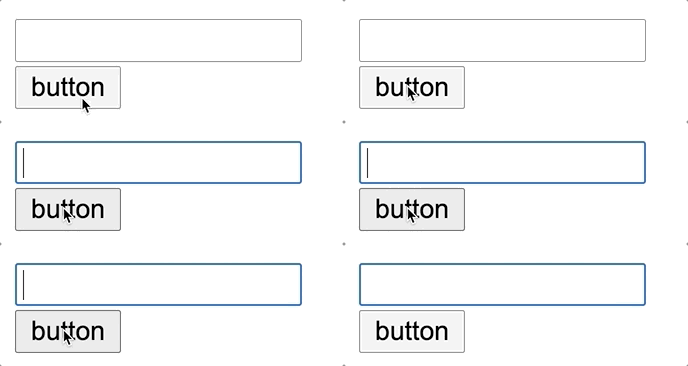
点击按钮让 input 文本框获取焦点。
input 文本框以及让文本框获取焦点的方法定义在 Input 组件中,在 App 组件中引入 Input 组件,按钮定义在 App 组件中。
// Input.js
class Input extends Component {
  constructor() {
    super()
    this.inputRef = React.createRef()
    this.focusInput = this.focusInput.bind(this)
  }
  focusInput() {
    this.inputRef.current.focus()
  }
  render() {
    return (
      <div>
        <input type="text" ref={this.inputRef} />
      </div>
    )
  }
}
// App.js
class App extends Component {
constructor() {
super()
this.InputComponentRef = React.createRef()
}
render() {
return (
<div className="App">
<Input ref={this.InputComponentRef} />
<button onClick={() => this.InputComponentRef.current.focusInput()}>button</button>
</div>
)
}
3. 组件
3.1 什么是组件
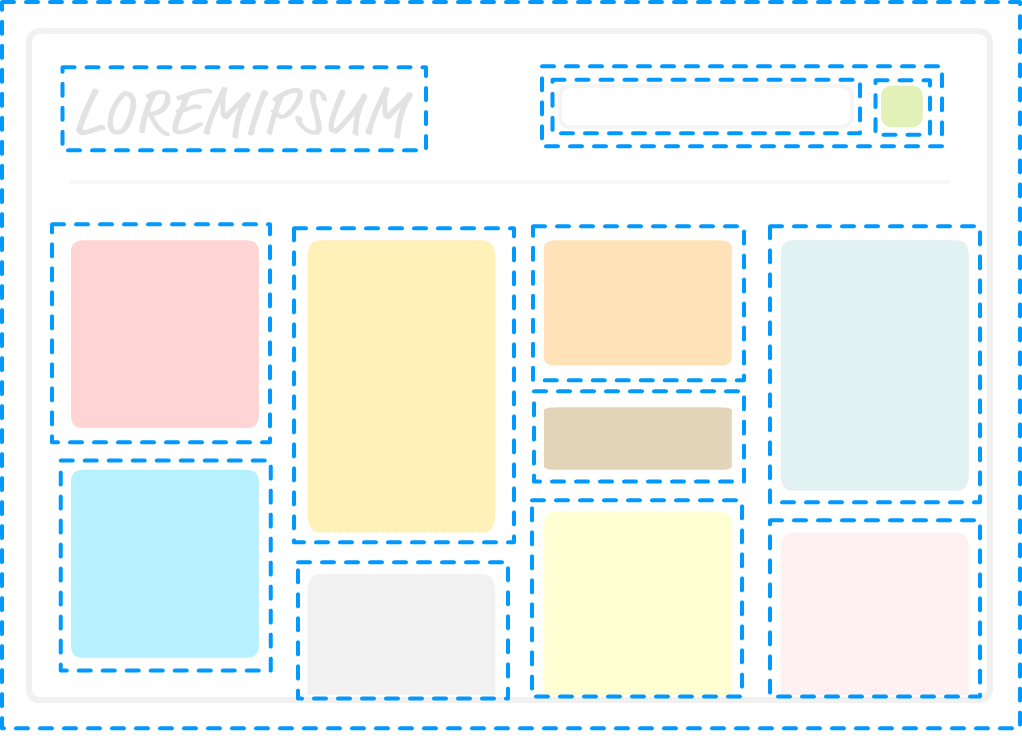
React 是基于组件的方式进行用户界面开发的. 组件可以理解为对页面中某一块区域的封装。
3.2 创建组件
3.2.1 创建类组件
import React, { Component } from 'react';
class App extends Component {
    render () {
        return <div>Hello, 我是类组件</div>
    }
}
3.2.2 创建函数组件
const Person = () => {
     return <div>Hello, 我是函数型组件</div>;
}
注意事项
- 组件名称首字母必须大写,用以区分组件和普通标签。
- jsx语法外层必须有一个根元素
3.3 组件 props
3.3.1 props 传递数据
在调用组件时可以向组件内部传递数据,在组件中可以通过 props 对象获取外部传递进来的数据。
<Person name="乔治" age="20"/>
<Person name="玛丽" age="10"/>
// 类组件
class Person extends Component {
render() {
return (
<div>
<h3>姓名:{this.props.name}</h3>
<h4>年龄:{this.props.age}</h4>
</div>
);
}
}// 函数组件
const Person = props => {
return (
<div>
<h3>姓名:{props.name}</h3>
<h4>年龄:{props.age}</h4>
</div>
);
}注意:
- props 对象中存储的数据是只读的,不能在组件内部被修改。
- 当 props 数据源中的数据被修改后,组件中的接收到的 props 数据会被同步更新。( 数据驱动DOM )
3.3.2 设置 props 默认值
class App extends Component {
    static defaultProps = {}
}
function ThemedButton(props) {
}
ThemedButton.defaultProps = {
theme: "secondary",
label: "Button Text"
};3.3.3 组件 children
通过 props.children 属性可以获取到在调用组件时填充到组件标签内部的内容。
<Person>组件内部的内容</Person>const Person = (props) => {
return (
<div>{props.children}</div>
);
}3.3.4 单向数据流
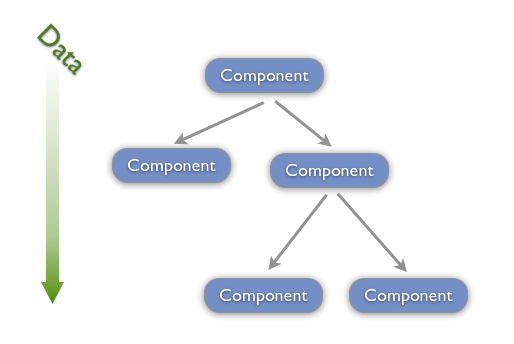
在React中, 关于数据流动有一条原则, 就是单向数据流动, 自顶向下, 从父组件到子组件.
单向数据流特性要求我们共享数据要放置在上层组件中.
子组件通过调用父组件传递过来的方法更改数据.
当数据发生更改时, React会重新渲染组件树.
单向数据流使组件之间的数据流动变得可预测. 使得定位程序错误变得简单.
评论